How to Optimise Retail Workforce Scheduling Using Analytics
Nabeel Fahim | 5 min read
Lastest Upate : 14 Nov 2025
Views : 10.7K
Retail workforce optimisation is becoming one of the most important operational priorities for modern retailers. With unpredictable store traffic, rising labour costs, and increasing pressure to improve customer experience, retailers need smarter, more accurate scheduling methods.According to Deloitte, labour now represents 50-60% of controllable retail operating costs. Traditional scheduling systems fail because they ignore the two most important metrics in retail workforce planning: CPS (Customers per Sales Staff) and TPC (Transactions per Cashier).
This blog explains how to optimise retail workforce scheduling, how to calculate CPS and TPC, how to measure retail footfall accurately, and how retailers can use data-driven staffing models to reduce labour waste, improve customer experience, and increase profitability.
What Are CPS and TPC in Retail Workforce Optimisation?
Retail workforce optimisation starts with understanding the real-time relationship between customer demand and staff capacity. Two metrics make this possible.
CPS (Customers Per Sales Staff)
This is the core metric of retail staffing optimisation. CPS shows how many shoppers each employee is responsible for at any given moment — a critical KPI for retail workforce planning.
CPS = Footfall Count / Number of Sales Floor Staff
When to use CPS ?
Retail sales floor scheduling
Staffing optimisation during peak hours
In-store customer experience analysis
Labour forecasting and demand planning
Retail productivity assessment
CPS benchmarks
0-5 CPS: Overstaffed (excess labour cost)
10-15 CPS: Optimal staffing
20-30 CPS: Understaffed (customer service risk)
30+ CPS: Severe understaffing
High CPS values indicate lost sales opportunities, longer wait times, and poor customer experience — issues shown to reduce sales performance and profitability when stores are understaffed. [Gustafsson & Herrmann, 2014]
TPC (Transactions Per Cashier)
TPC is essential for optimising checkout labour, reducing queue times, and improving front-end efficiency.
TPC = Number of POS Transactions / Number of Cashiers
When to use TPC ?
POS and cashier scheduling
Queue time optimisation
Checkout performance analysis
Retail labour allocation
TPC benchmarks
0-8 TPC: Overstaffed (excess labour cost)
8-15 TPC: Efficient
15-25 TPC: Queue risk
25+ TPC: Long lines and cart abandonment
TPS is especially important for grocery, beauty, apparel, and convenience retail because these sectors have high transaction volume and customers expect fast checkout — queue delays increase abandonment by up to 20% in peak hours [McKinsey Queueing & Retail Study]
Why Retail Workforce Optimisation Matters
Retail workforce optimisation is no longer optional. With fluctuating footfall, rising wages, and customer expectations at an all-time high, retailers need accurate, data-driven scheduling systems more than ever.
Benefits of retail workforce optimisation
Lower labour costs through precise staffing
Higher conversion rates during peak hours
Improved retail customer experience
Better sales floor coverage
Reduced employee burnout and turnover
Improved compliance with labour laws
Retailers that optimise workforce scheduling outperform those who don't. McKinsey reports that labour optimisation can reduce retail labour cost by 8-12% while increasing in-store sales by 4-8%.
How to Measure Footfall Traffic for CPS Calculations
To calculate CPS, you need accurate retail footfall data. Poor-quality footfall data leads to unreliable staffing decisions and inaccurate workforce planning.
Here are the most common footfall tracking technologies used in retail.
1. Infrared Beam Counters (IR Footfall Sensors)
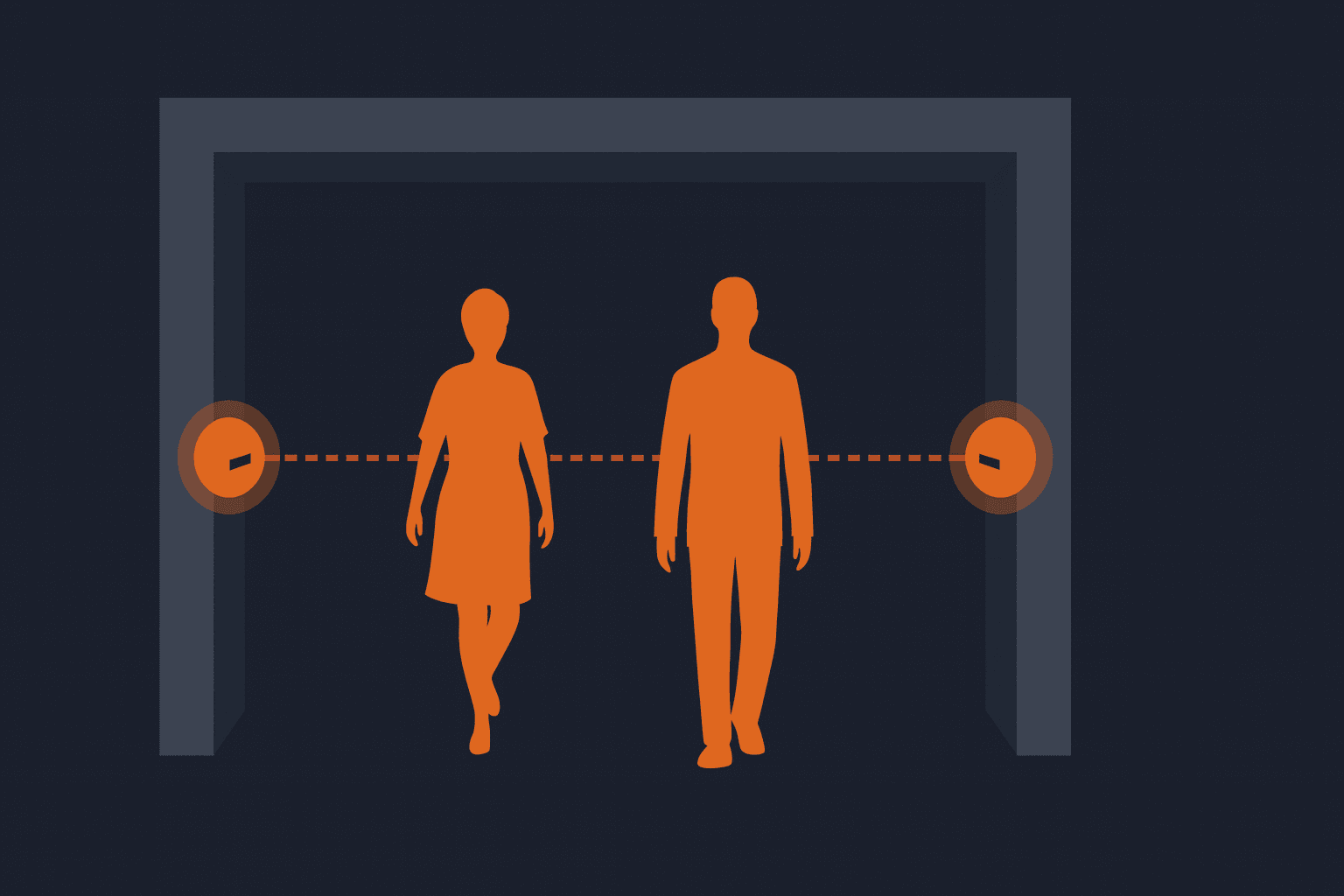
Infrared beam counters use a simple horizontal IR beam placed across the store entrance. Every time the beam is broken, the system counts it as a person passing through. They are one of the oldest and most affordable footfall measurement methods, commonly used in small retail environments with lower traffic complexity.
Pros
- Cheapest people counting solution
- Easy to install
- Suitable for small retail stores
Cons
- Lower accuracy (65-80%)
- Doesn't handle multi-person entry
- No direction or dwell time
2. Overhead Thermal Sensors
Thermal sensors are mounted above the entrance and detect people using heat signatures. By tracking changes in temperature and movement, they can count the number of individuals entering and exiting the store. These devices offer better accuracy than IR beams and work well in medium-sized retail settings.

Pros
- Good accuracy (75-90%)
- Distinguishes entrances vs exits
- Works for mid-size stores
Cons
- Sensitive to temperature changes
- Doesn't provide behavioural analytics
3. AI Video Footfall Counters (Most Accurate)
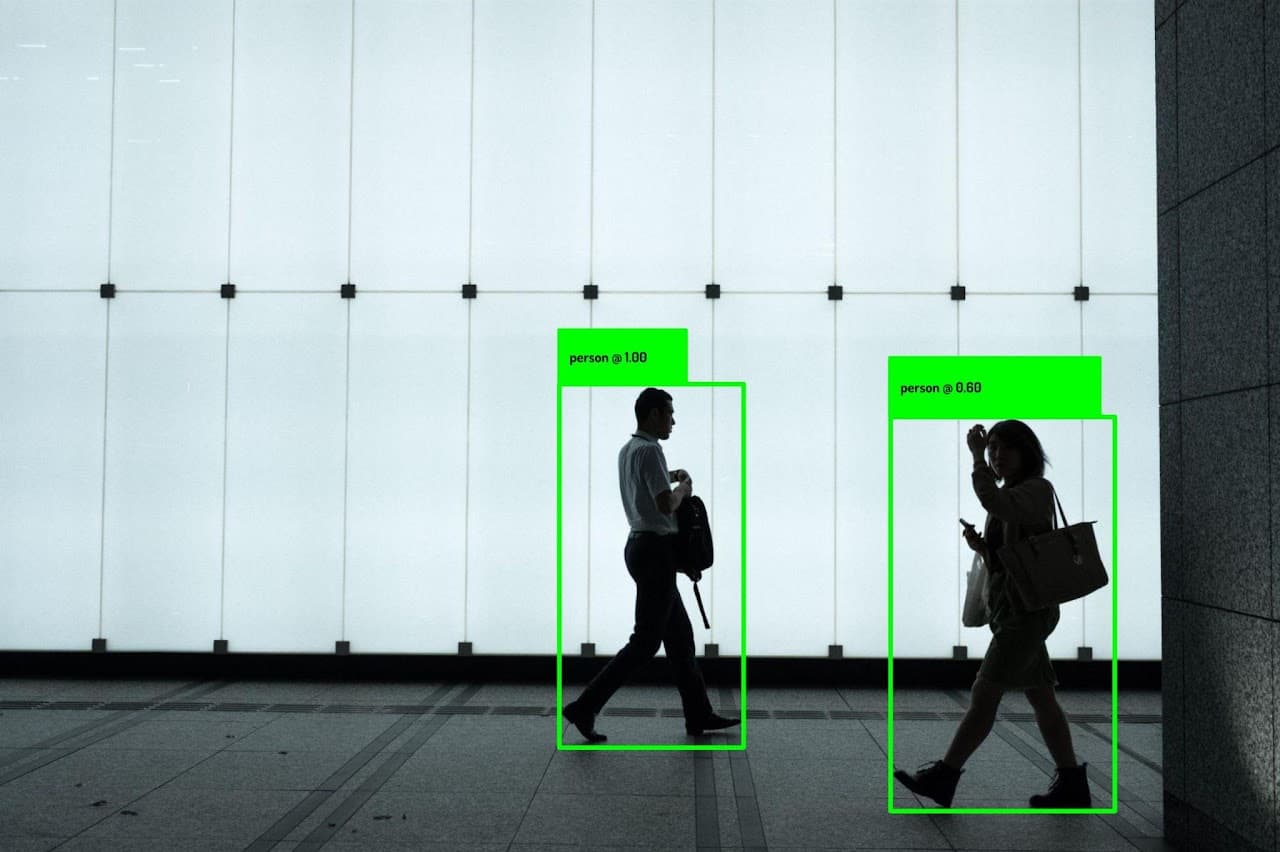
AI video counters use overhead cameras and computer vision to identify and count people with high accuracy. They can distinguish individuals in groups, track movement patterns, measure dwell time, and generate in-store heatmaps. This is the most advanced and reliable method for retailers who need detailed footfall analytics.
Pros
- 90-98% accuracy
- Tracks traffic, groups, conversion, dwell time
- Supports in-store heatmaps
- Ideal for enterprise retail
Cons
- Higher cost
- Requires installation + subscription
Price: $1,000-$3,000 per sensor
Best for: Supermarkets, malls, high-traffic stores
Our Best Pick: Milesight VS125 AI Stereo
How to Optimise Retail Workforce Scheduling (Step-by-Step)
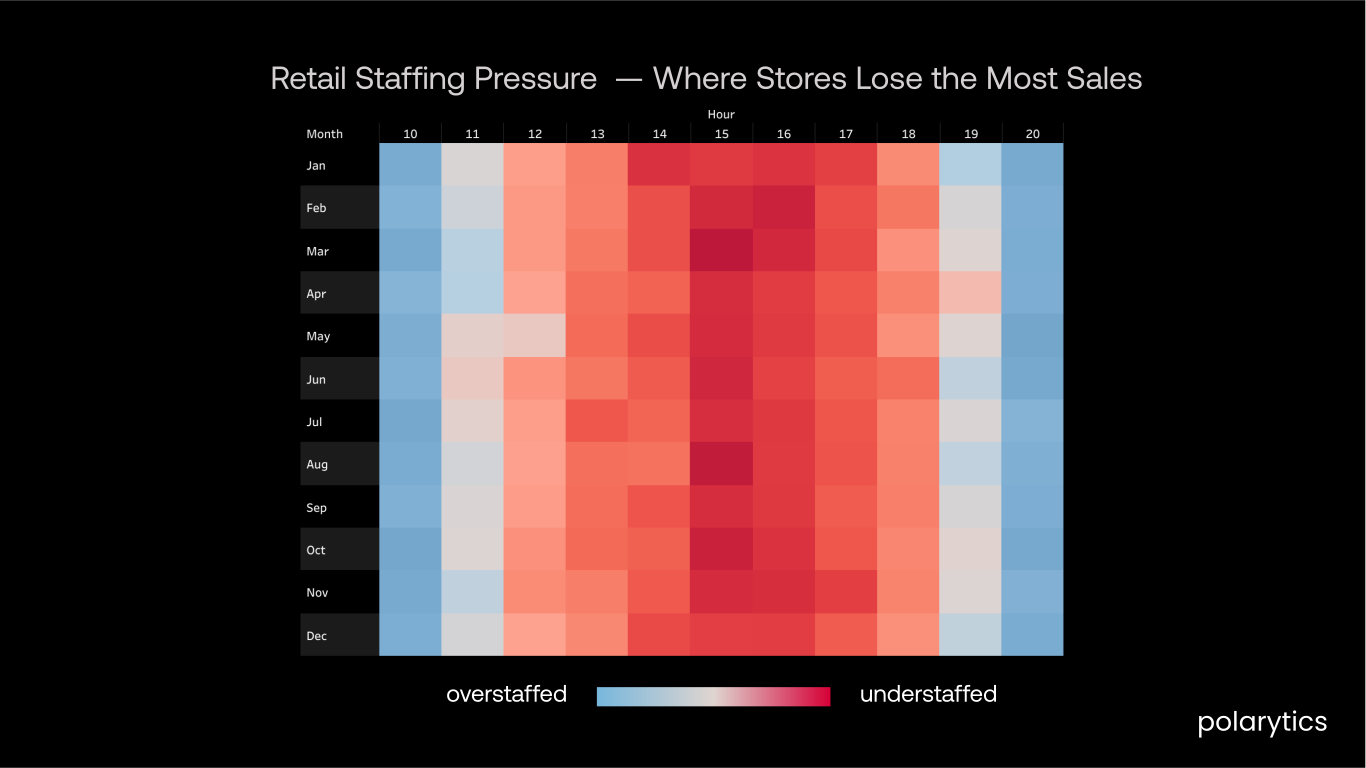
Step 1: Build Monthly and Hourly CPS/TPS Heatmaps
A CPS heatmap reveals:
When the store is understaffed
When labour cost is wasted
Seasonal and monthly traffic trends
Peak hour staffing needs
Weekend vs weekday patterns
This is the backbone of retail workforce optimisation.
Step 2: Identify Peak Staffing Hours
For most retailers, peak demand appears between 1 PM and 5 PM. However, each store has its own traffic shape.
Use CPS/TPS heatmaps to detect:
High CPS hours increase sales floor staff
High TPS hours open more POS lanes
Low CPS hours reduce labour allocation
Step 3: Forecast Labour Demand Using Historical Data
Traffic may vary day to day, but hour-level demand is extremely consistent month over month. This makes retail labour forecasting surprisingly reliable.
Factors to consider:
Seasonal footfall patterns
Promotions and campaigns
Weather patterns
Pay-week cycles
Local events
Forecasting accuracy improves retail workforce planning and ensures stores avoid understaffing during critical sales windows.
Step 4: Use Dynamic Scheduling Instead of Static Templates
Most retailers still use fixed shifts like:
10 AM-6 PM
12 PM-8 PM
But optimised staffing requires:
Micro-shifts for peak hours
Flexible staff rotation
Break staggering
Real-time schedule adjustments
This reduces labour waste and prevents service bottlenecks.
Step 5: Track Retail Workforce KPIs
Top retail workforce KPIs include:
CPS
TPS
Labour cost per hour
Sales per labour hour
Customer service time
Queue abandonment rate
Schedule adherence
Monitoring these KPIs ensures continuous workforce optimisation.
Conclusion — Smarter Retail Workforce Scheduling Starts with Better Data
Retail workforce optimisation is not just about reducing labour costs — it's about improving customer experience, boosting conversion rates, and building a fair, efficient, and predictable work environment for retail teams.
By using CPS, TPS, footfall analytics, and demand forecasting, retailers can:
Reduce labour cost by 8-15%
Improve store conversion and average basket size
Reduce employee burnout
Improve staff productivity
Deliver a consistently better customer experience
If you want a ready-made CPS/TPS analysis or a full workforce optimisation dashboard — without hiring a full-time data analyst — you can explore what we're building at polarytics.
Save time. Reduce labour waste. Improve customer experience.
That's smart retail optimisation.
FAQ — Retail Workforce Optimisation
What is CPS in retail and why does it matter?
CPS (Customers Per Sales Staff) shows how many shoppers each associate is responsible for at any moment. It's the core metric behind retail workforce optimisation.
How do I calculate TPC?
TPC = Total POS Transactions ÷ Number of Cashiers. This metric helps retailers optimise checkout staffing and reduce queue times.
What is the best way to measure footfall accurately?
The most accurate methods are AI-powered overhead video counters (90-98% accuracy), but smaller stores can start with IR beam sensors.
Do I need a people-counting device to start?
No. You can begin with manual traffic sampling or POS data patterns, then upgrade to IR, thermal, or AI sensors for full accuracy.
Can Polarytics help automate CPS/TPS reporting?
Yes. Polarytics builds automated dashboards so you don't have to calculate CPS/TPS manually or hire a full-time analyst.